
PDF To Link Professional Sharing
Upload, host, and share your PDF files online —complete control, enterprise security, professional results
FileDrop is the professional solution for sharing PDF files online securely with clients, colleagues, and stakeholders.
Upload your PDFs to generate secure FileDrop.me links with a built-in browser viewer.
Trusted by legal teams, businesses, real estate professionals, and organizations that need reliable document sharing.
What You Get:
- Upload PDFs in under 10 seconds
- Complete access control (passwords, link expiration, view limits)
- Disable downloads
- Acces with email for lead generation
- Dynamic Watermarks (custom text, email, IP, date and time)
- Flipbook Mode – for presentations or catalogs
- Embed on any website
- Custom domain
What Your Clients Experience:
- Instant viewing in any browser—no downloads
- Works perfectly on any device
- No account or login required
- Fast, secure, friction-free access
- NO ADS
Certified for Your Security
FileDrop is GDPR, CCPA, and nFADP compliant. Thanks to our TLS encryption technology, your documents are always processed with an added layer of security.


Secure file management you can trust – Industry-leading encryption and data protection at every step.

Built with your privacy in mind – Fully compliant with EU and international data protection standards.

Crafted with care in the EU – Built to last, adhering to the highest standards of quality and safety.

Unmatched customer support, 24/7 – We're just a message away to help with any concerns.
Flipbook Mode
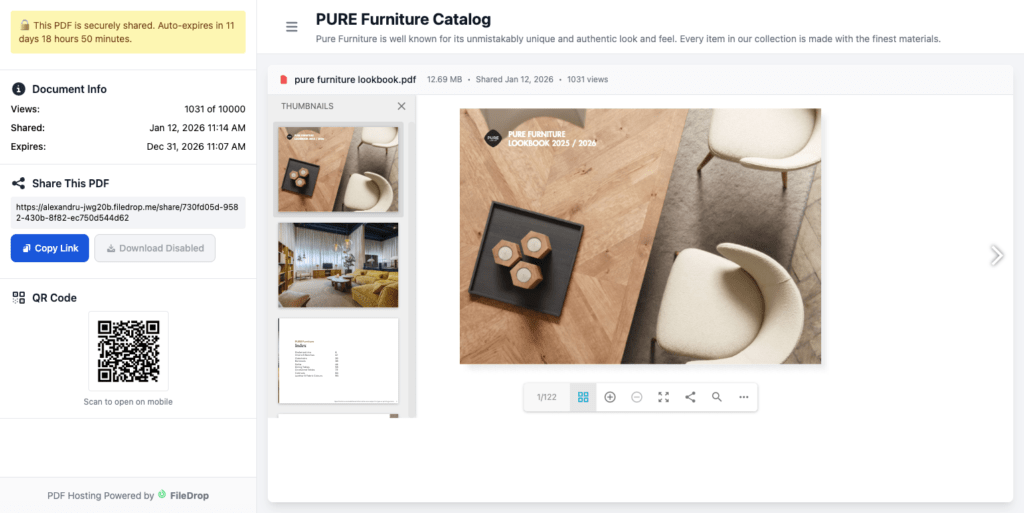
Transform your PDF into an interactive flipbook with realistic page-turning animations, FileDrop’s PDF Hosting is the tool for that.
It’s perfect for catalogs, magazines, portfolios, or reports that will look amazing for viewers.
Share PDFs links with Watermarks
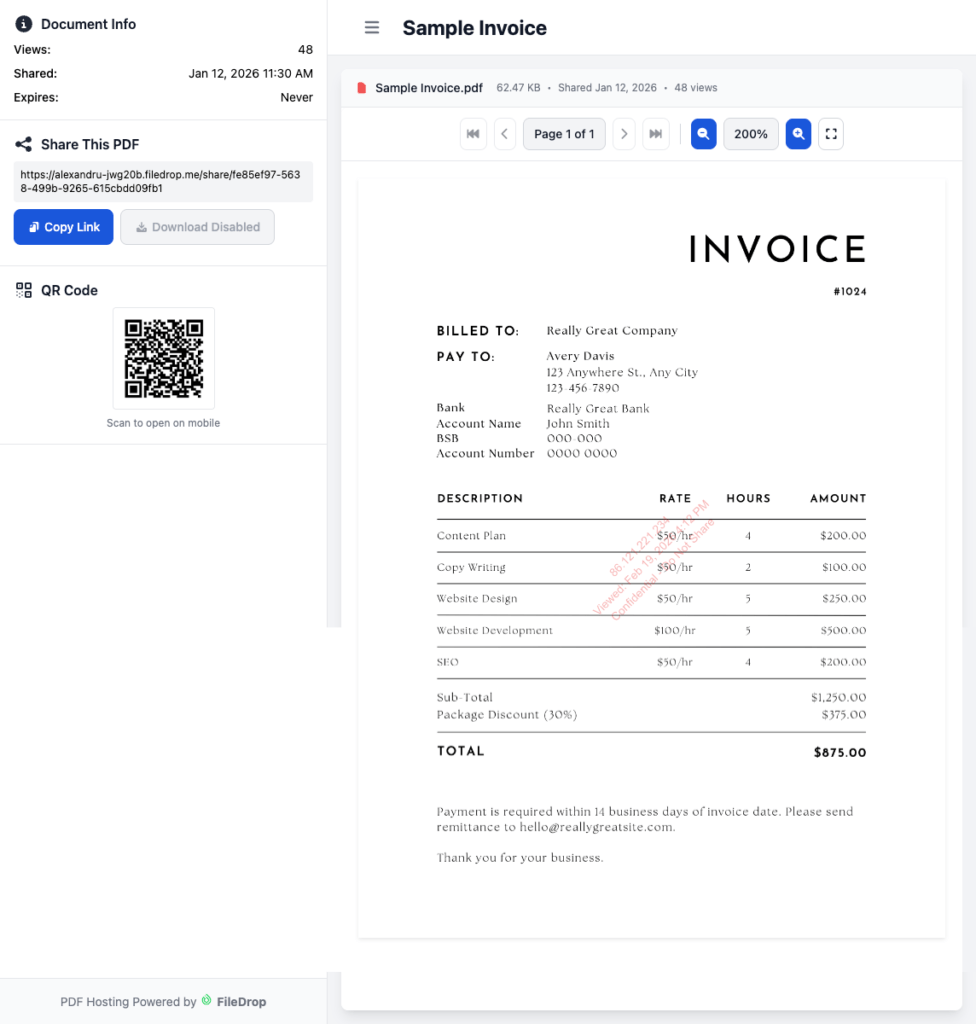
Upload a PDF file and enable the Watermark feature. Here we have a few settings to add the viewer’s IP, date and time, a custom text (company name, offer name, and so on), and also an email address.
The email address can be added only when the user is verified by a PIN they receive via email.
You can change the watermark color, position, opacity, and size.

PDF Statistics
With every paid plan users have access to advanced statistics.
These includes unique visitors, country, visits and much more.

How FileDrop's PDF Hosting Works
Step 1
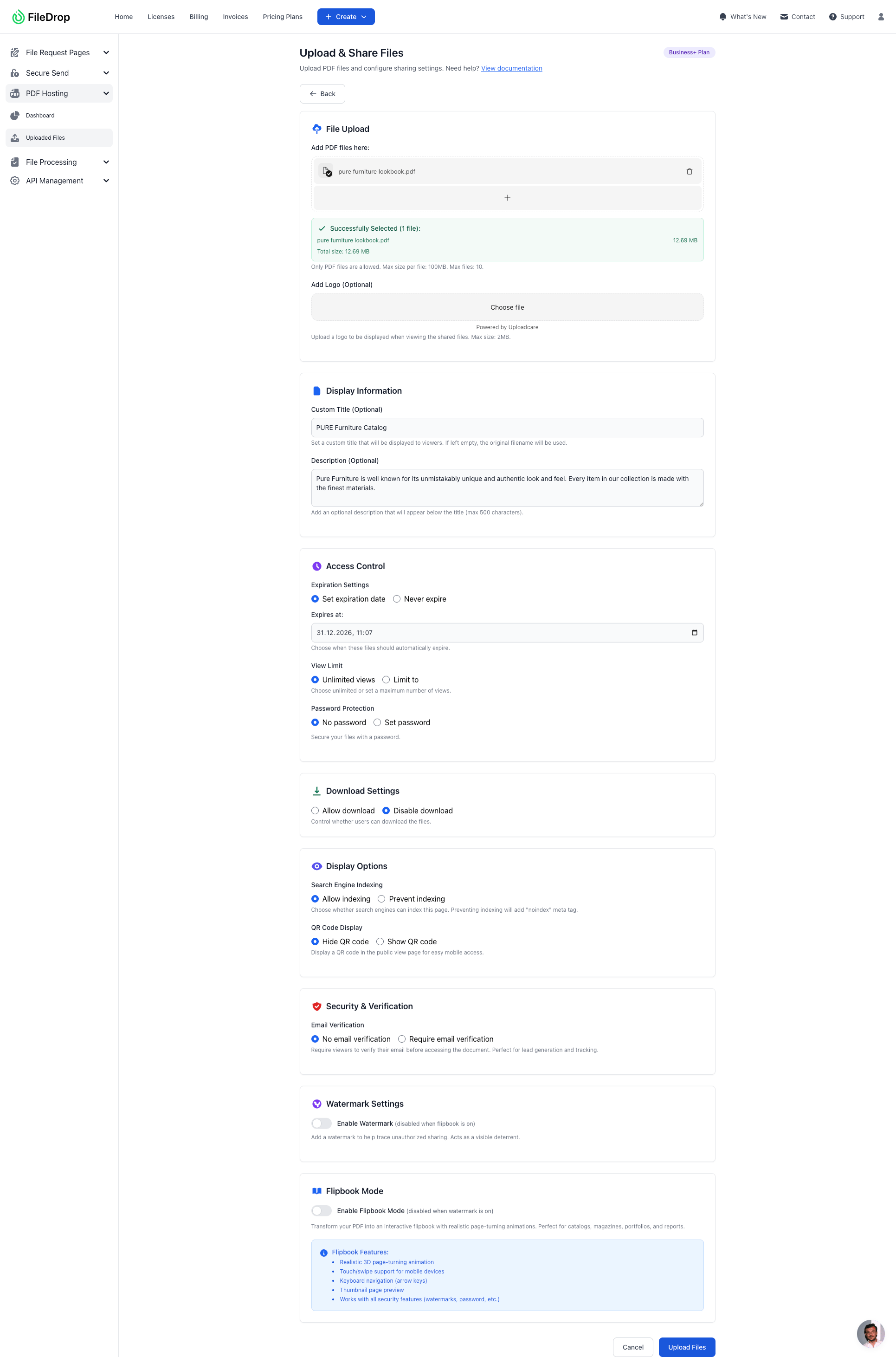
Add the PDF to our drag and drop upload area and select your settings. Click upload and the sharing will will be generated automatically.
Step 2
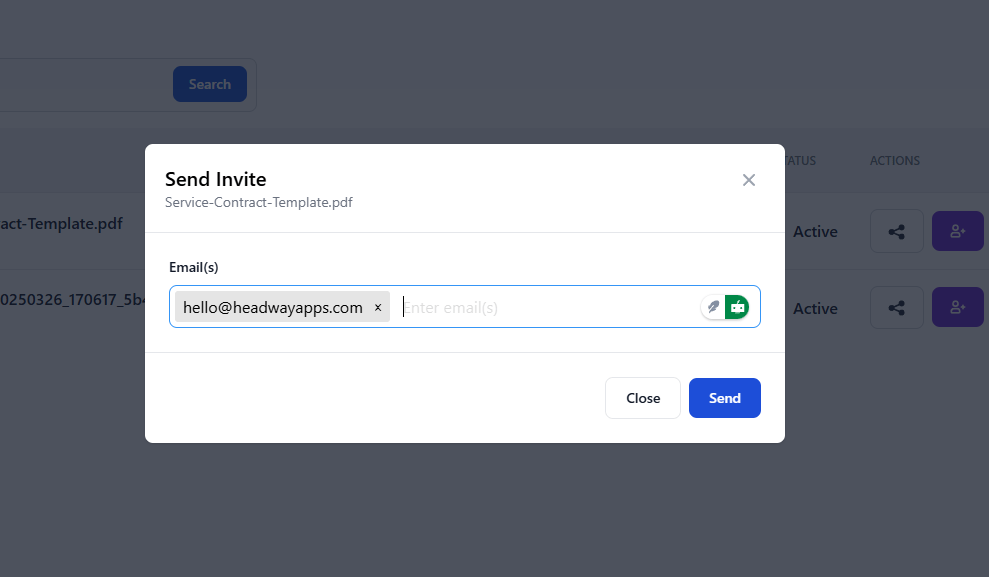
Optionally share the file with our email invite option.
Step 3
Once an user has submitted a web form with files you can view them in the dashboard. If the user has filled in the form from an invite, the invite will be closed.
Step 4
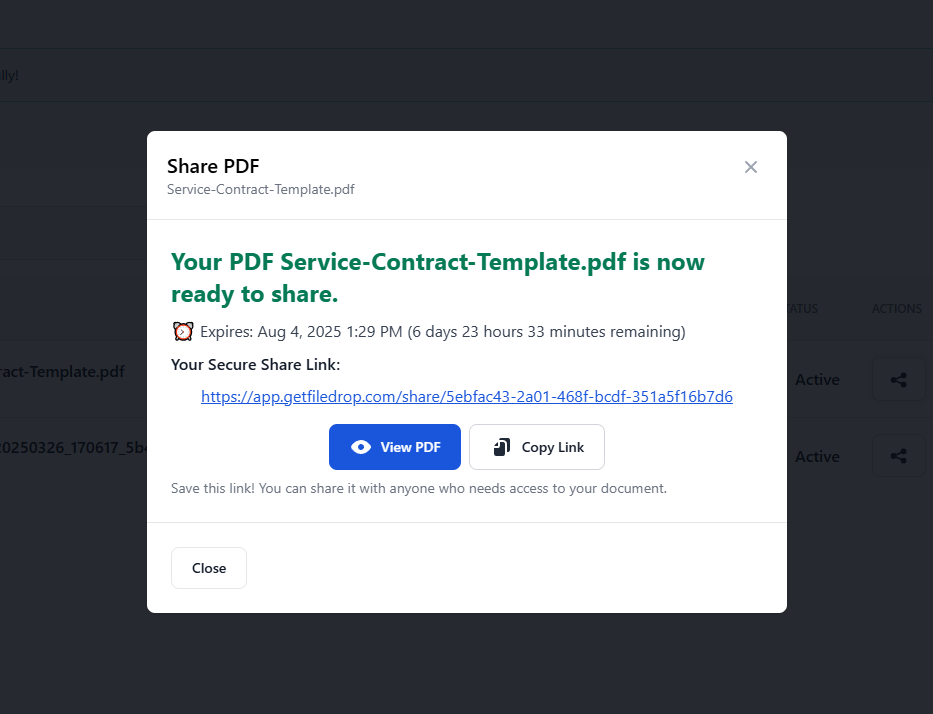
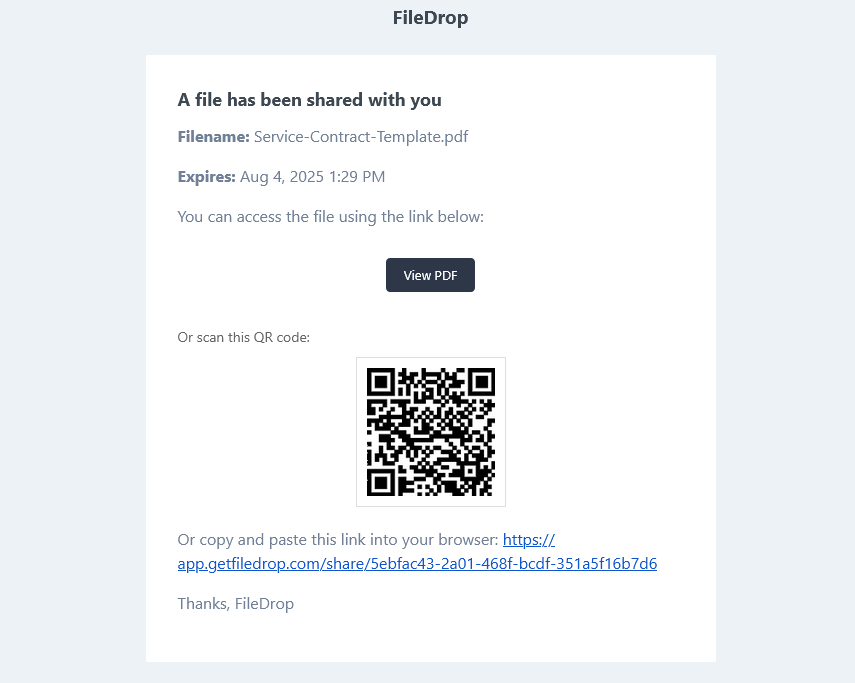
The user will receive an email with the link and also a QR code that can be used from a tablet or phone.
Key Features for Professional PDF Hosting
Drag and Drop Upload Area
Upload your PDF files effortlessly with our intuitive drag-and-drop interface. Select files from your PC, phone, Dropbox, or OneDrive. The upload process is instant and designed for professionals who value speed and simplicity.
Multiple Files Per Link
Upload multiple PDF files under a single shareable link, making it easy to share related documents, proposals with appendices, or collections as one convenient package for your recipients.
Flipbook Mode
Transform your PDF into an interactive flipbook with realistic page-turning animations. Perfect for catalogs, magazines, portfolios, and reports.
Expiration Dates
Configure automatic link deactivation by setting expiration dates. Your hosted PDFs can expire after a specific date or time period, ensuring outdated documents don't remain accessible and maintaining version control.
Limit the number of views
Set a maximum number of times your PDF can be viewed. Configure single-use links, limit to 5 views, 10 views, or any specific number. After the limit is reached, the file becomes unavailable automatically—perfect for controlling document circulation.
Disable Downloads & Printing
Control whether recipients can download your PDF files or keep them view-only. This feature helps you limit the distribution and sharing of your documents while still allowing recipients to view them online.
Automatic QR Codes
Every hosted PDF automatically generates a QR code that recipients can scan with their mobile devices. Perfect for print materials, business cards, property signage, or any situation where you want to enable instant mobile access to your documents.
Mobile-Friendly Viewing
All hosted PDFs are optimized for viewing on smartphones and tablets. Your recipients can easily view documents on any mobile device, and the QR code feature makes it simple to transfer viewing from one device to another.
Email Invites with QR Codes
Share PDFs directly via email through our built-in invite system. Each email includes a secure link to view the PDF, an automatic QR code for instant mobile access, your custom message to recipients, and clear viewing instructions.
Dynamic Watermarks
Add watermarks to protect the content and prevent sharing with email, custom text, IP and date and time.
Personalize With Your Logo
Add your logo or another type of image to personalize your PDF link page.
Secure PDF Hosting
All files are secured with encryption in transit and end-to-end encryption to keep client data safe. Your hosted PDFs are protected throughout the upload, storage, and sharing process.
Password Protection
Add password protection to your hosted PDFs to restrict access to authorized recipients only. Essential for confidential business proposals, financial reports, legal documents, and sensitive information that requires an extra layer of security.
Embed on any website
Once a file is uploaded and the link is generated you can embed the PDF on any website you want.
Custom Domains
Set your own domain and all the PDF links will be updated automatically.
Ready to Sign up
Compare Features
| Features | Free | Pro | Business+ | Executive |
|---|---|---|---|---|
| Simple drag and drop upload | Yes | Yes | Yes | Yes |
| Max no. of Files | 5 | 50/month | 100/month | 500/month |
| File Storage | 50 MB | 500 MB | 1 GB | 5 GB |
| Views | 10,000 | Unlimited | Unlimited | Unlimited |
| PDF File Size | 4 Mb | 25 Mb | 50 Mb | 100 Mb |
| Multiple files per link | Yes - 2 | Yes - 10 | Yes - 10 | Yes - 10 |
| Limit the number of views per file | Yes | Yes | Yes | Yes |
| Custom domain | No | No | Yes | Yes |
| Remove FileDrop banner | No | Yes | Yes | Yes |
| Analytics | No | Yes | Yes | Yes |
| Set expiration date | Yes | Yes | Yes | Yes |
| Add your logo | Yes | Yes | Yes | Yes |
| Email Invites - Share to users via email | No | Yes | Yes | Yes |
| Automatic QR code for all files | No | Yes | Yes | Yes |
| Password Access | No | Yes | Yes | Yes |
| Disable Download & Printing | No | Yes | Yes | Yes |
| QR Code | No | Yes | Yes | Yes |
| Collect emails | No | No | Yes | Yes |
| Embed on page | Yes | Yes | Yes | Yes |
| Watermarks | No | Yes | Yes | Yes |
| Flipbook Mode | No | Yes | Yes | Yes |
Best Use Cases
Business & Professional
Challenge: Sending large proposals and contracts via email hits size limits, and you can’t control access after sending.
Solution: Host your quarterly business proposal with a 7-day expiration date and password protection. After the review period ends, the link automatically deactivates, ensuring your pricing and strategy don’t circulate indefinitely.
Legal & Compliance
Challenge: Sharing case files and legal documents via email compromises attorney-client privilege and creates security risks.
Solution: Share a confidential settlement agreement with a 3-view limit—one for your client, one for opposing counsel, and one for the mediator. After three views, the link becomes inactive, preventing unauthorized access.
Education & Training
Challenge: Course materials sent via email get shared beyond enrolled students, and outdated versions keep circulating.
Solution: Upload your semester syllabus and set it to expire on the last day of class. When the course ends, students can no longer access the material, and you maintain control over your educational content.
Healthcare & Medical
Challenge: Patient records and test results require secure sharing with time-limited access.
Solution: Share lab results via email invite with an automatic QR code. Patients receive an email on their computer and can instantly scan the QR code to view results on their phone, with the link expiring after 30 days.
Creative & Marketing
Challenge: Portfolio PDFs are too large for email, and you want to control how potential clients access your work.
Solution: Create a portfolio link for each prospective client with a unique password. Track which clients have viewed your work, and set view limits to prevent your portfolio from being shared beyond your intended audience.
Real Estate & Property
Challenge: Property information packets are too large for email, and printing is expensive and wasteful.
Solution: Upload your property listing PDF and generate a QR code for your “For Sale” sign. Interested buyers scan with their phone and instantly view the full property packet—floor plans, disclosures, and photos—on their mobile device.
Consulting & Professional Services
Challenge: Client deliverables sent via email can be forwarded to competitors or accessed long after the engagement ends.
Solution: Host your strategic analysis report with downloads disabled. Clients can view and read the document online, but they can’t download, save, or forward it to unauthorized parties.
Frequently Asked Questions
What is PDF Hosting?
PDF hosting is a professional online service that stores your PDF files on secure servers and provides shareable links for controlled access. Unlike email attachments, hosted PDFs can be viewed in any web browser without downloading, and you maintain complete control through passwords, expiration dates, and view limits.
What is FileDrop PDF Sharing?
FileDrop offers a secure hosting service specifically designed for sharing PDF files online. It provides an easy drag-and-drop interface that allows users to upload, customize sharing settings, and distribute PDF documents with enhanced security features.
How do I upload a PDF file?
Simply drag and drop your PDF file into the upload area on the website, or use the upload button to select files from your PC, phone, Dropbox, or OneDrive. Configure your security settings like password, expiration, and view limits. Click “Upload” and receive your shareable link instantly. The entire process takes under 10 seconds.
What security features are available?
FileDrop offers several security options:
- Password protection for sensitive documents
- View limits – restrict how many times a file can be accessed
- Expiration dates – automatically disable access after a set period
- End-to-end encryption for data protection in transit
- Disable download – limit the sharing of the file
Is there a file size limit?
No, FileDrop has no file size limit, making it suitable for large PDF documents, presentations, or detailed reports.
How does email sharing work?
You can send email invites directly through the platform. Recipients receive an email with:
- A direct link to view the PDF
- An automatic QR code for easy mobile access
- Clear instructions for viewing
Is FileDrop mobile-friendly?
Yes, all shared PDF files are optimized for mobile viewing. Recipients can easily view documents on smartphones and tablets, and the QR code feature makes it simple to transfer viewing from one device to another.
What are the pricing tiers?
- Free: 5 files with all basic features
- Pro: 50 files
- Business+: 100 files
- Executive: 500 files
All tiers include drag-and-drop upload, view limits, expiration dates, email invites, and QR codes.
Can I track who views my PDFs?
Yes, you can monitor file access through the dashboard and set view limits to control how many times each document can be accessed.
What happens when a file expires or reaches its view limit?
The file becomes unavailable to recipients automatically. This ensures your sensitive documents don’t remain accessible indefinitely.
Learn how to use our PDF hosting feature



FileDrop Suite
File Request Pages
Create branded web pages with forms and allow users to send data and files. Send requests via email.
Secure Send
Send messages and files to users securely via branded download pages.
File Processing
Convert files in 37 formats, extract data via batch OCR, edit images and more.
PDF Hosting
Share PDF files securely with a simple PDF viewer via expiring links, limit views, download and printing.
Google Sheets Add-on
The best file management tool for Sheets and Drive, drag and drop, batch insert, rename etc.